What is Codex's Windows sandbox?
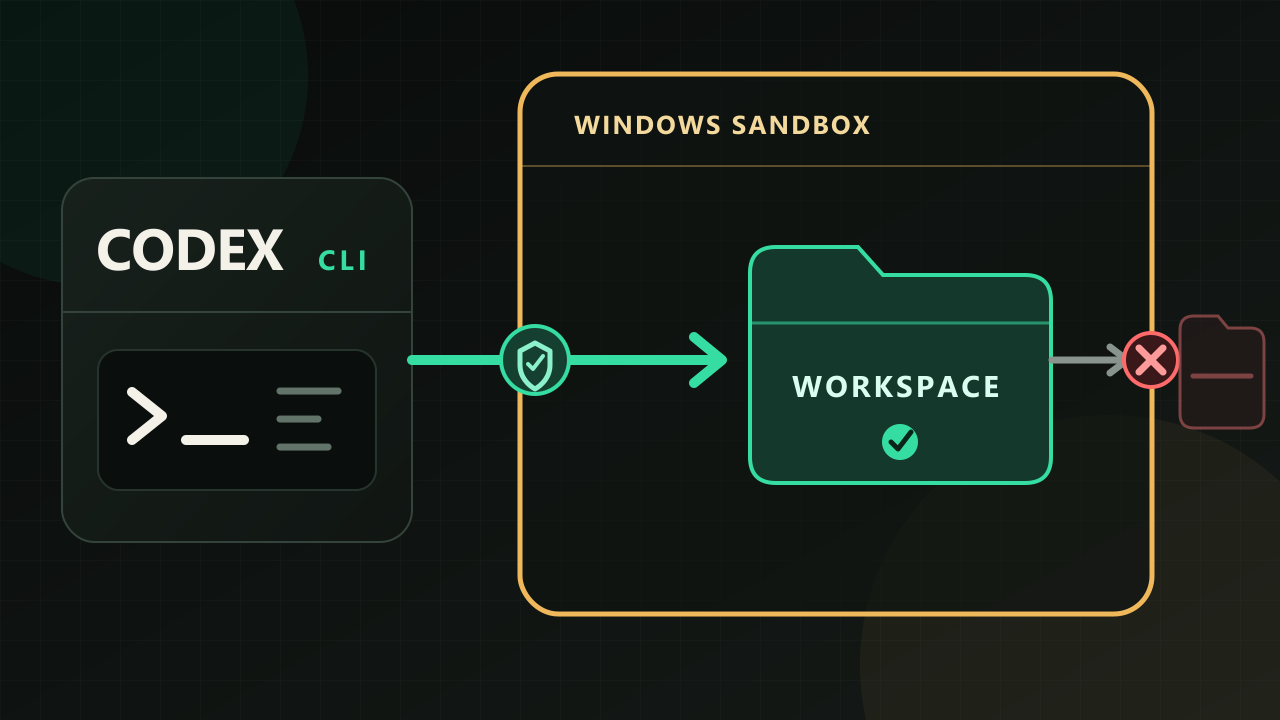
Giving Codex access to a project folder does not give it access to all of Windows. The Windows sandbox constrains where Codex commands can operate so they cannot stray beyond the permitted workspace.
On Windows, Codex enforces this boundary through two backends: elevated and unelevated.
Sandbox scope and backend are separate settings
sandbox_mode and the Windows sandbox backend serve different purposes.
A sandbox_mode such as read-only, workspace-write, or danger-full-access sets the scope Codex is allowed to work within. It determines whether Codex can only read files or can also modify them inside the workspace.
sandbox_mode defines the boundary; elevated and unelevated determine how Windows enforces it.
Choosing elevated does not stop Codex from creating or modifying files within the workspace permitted by workspace-write. A sandbox is not meant to prevent the work itself. It limits changes beyond the permitted area.
Elevated creates dedicated Windows accounts for Codex
Setting up elevated for the first time requires administrator approval. The setup creates two Windows user accounts, CodexSandboxOffline and CodexSandboxOnline. Codex then runs commands under one of them depending on the execution conditions.
You do not sign in to these accounts. Codex uses them only when it runs commands internally. Commands therefore run under an identity separate from the user currently signed in. Codex combines that separation with file permissions, the firewall, and local Windows policies to establish the boundary.
The separate account is only part of the boundary. When Windows starts a program, the process receives an access token describing its identity and permissions—something like an ID card. elevated runs commands with a restricted version of the dedicated account's token, with unnecessary privileges removed.
Unelevated uses a restricted token derived from the current user
unelevated does not create a separate Windows user account. Instead, it takes the access token of the signed-in user and creates a restricted token with fewer permissions. Codex commands run with this token.
ACLs work alongside the restricted token. If the token is the process's ID card, an ACL is the access list attached to a file or folder. It specifies who may enter and what they may do once inside. Together, a restricted token and ACLs can enforce a boundary such as “this folder is writable, but that one is not.”
unelevated is also a sandbox. It is the official fallback for environments where administrator access is unavailable or policy prevents the creation of separate accounts.
What happens when you try to write a file
We tested both backends under the same conditions with Codex CLI 0.146.0. We used the Windows-native codex sandbox command, PowerShell, and the :workspace permission profile. The sandbox could not request additional approval during the test.
| Backend | User running the command | Inside the permitted workspace | Same canary folder outside the workspace |
|---|---|---|---|
elevated | CodexSandboxOffline | File creation succeeded | Write failed |
unelevated | Signed-in user | File creation succeeded | Write failed |
A program running outside the sandbox could write to the same canary folder. The folder was not inherently read-only. The write failed only when either sandbox backend was active.
In this test, unelevated enforced the filesystem boundary too. Neither backend, however, blocks changes inside a workspace permitted by workspace-write.
If both blocked the write, what is different?
In our test, both backends produced the same result: writes succeeded inside the workspace and failed outside it. That does not mean their isolation models—or their overall security—are equivalent.
elevated runs commands under an account separate from the current user. It also applies file permissions and local Windows policies. When network access is disabled, it installs a WFP filter for the dedicated offline user. WFP is a Windows feature that filters network traffic.
unelevated starts by restricting the current user's token. When network access is disabled, it sets up a loopback proxy, switches package managers to offline mode, configures a Git proxy, and blocks SSH, among other controls.
The two backends use fundamentally different isolation mechanisms. Our test, however, covered only the filesystem write boundary. It did not compare the practical effectiveness of network blocking or how difficult either backend might be to bypass.
Which should you choose?
OpenAI's Windows sandbox documentation presents elevated as the preferred option. If administrator approval is available and you do not encounter a compatibility issue, start with elevated.
If company policy or the lack of administrator access prevents the initial setup, you can choose unelevated. That does not make it inherently unsafe. It is a sandbox built with a restricted token and ACLs, and in our test it blocked writes outside the permitted workspace.
You can change the setting later in your personal ~/.codex/config.toml file.
[windows]
sandbox = "elevated"
Change the value to "unelevated" when needed.
As a rule of thumb, start with elevated when administrator approval is available and no compatibility issues arise. Otherwise, use unelevated. Whichever backend you choose, sandbox_mode separately determines the scope Codex is allowed to work within.
Sources
- OpenAI Codex: Windows sandbox
- OpenAI Codex: Basic configuration
- OpenAI Codex source 0.146.0: Sandbox user setup, identity and restricted token
- OpenAI Codex source 0.146.0: Unelevated spawn preparation, offline environment controls
- OpenAI Codex source 0.146.0: WFP setup
- Direct observation — Codex CLI 0.146.0, Windows-native
codex sandboxcommand, PowerShell,:workspace, no additional approval inside the sandbox, July 30, 2026